Documentation This documentation applies only to iceScrum v7.
For old iceScrum R6, read the documentation or migrate.
-
1 - Install or Upgrade
-
2 - Getting started
-
3 - Core features
4 - Apps & integrations
Neatro
Companion
MURAL
Microsoft Teams
Discord
iObeya
Zoom
Google Hangouts Meet
Jamboard by Google
Miro
Jitsi Meet
Mattermost
Custom project dashboard
Agile KPIs
Webhooks
Forecast
Agile fortune
SAML Authentication
Labels
Share
Zapier
Story workflow
FeatureMap
Time tracking
Diagrams & mockups
Epic stories
Portfolio
Project Roadmap
Toolbox
External authentication
Continuous integration
Cloud attachments
Team capacity
Bug trackers
LDAP / Active Directory
Slack
Project administration
User administration
Server administration
Git & SVN
Data export
Mood
Excel import
Task responsible
Story vote
Story template
Apps & integrations
Custom Backlogs
-
5 - Migration
-


As the server administrator, change your server settings through a nice user interface.
Settings
The configuration of your iceScrum server is stored into a file named “config.groovy”. You can update it manually but this is error-prone and will take effect only after restarting the server. This App offers a better way to update your configuration through a nice user interface where most of the changes don’t require restarting the server.
Unlike most Apps, this App is server-wide. That means that it cannot be used on iceScrum Cloud. Otherwise, if your license includes it, then it will be enabled automatically. It adds a new menu named “Settings” in the home page of Administrators.
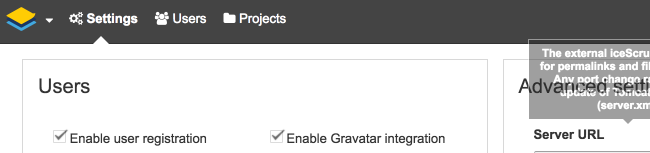
This documentation only includes core iceScrum settings but Apps can also have their own configuration entries. Refer to the Apps documentation for more information.
By default, the config.groovy file is stored under your home/.icescrum directory. You can change the file location by adding this to your JVM parameters:
[shell classname=”api-url”]-Dicescrum_config_location=/path/to/dir/where/i/can/write/config.groovy[/shell]
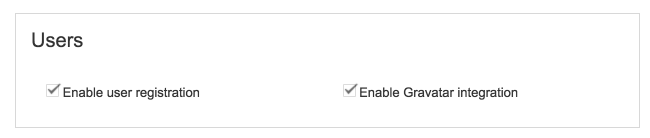
Users
Configure general user capabilities.
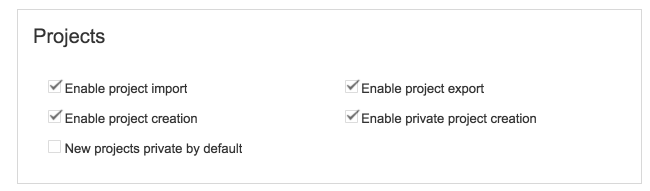
Projects
Configure general permissions for projects. These permissions don’t affect the admin user who is always able to manage projects.
Several important iceScrum features rely on the ability to send email. Such features are invitations, notifications when stories are updated and password retrieval. For that, iceScrum requires an external SMTP server.
Enter the email server host, port and your username/password if your server requires authentication.
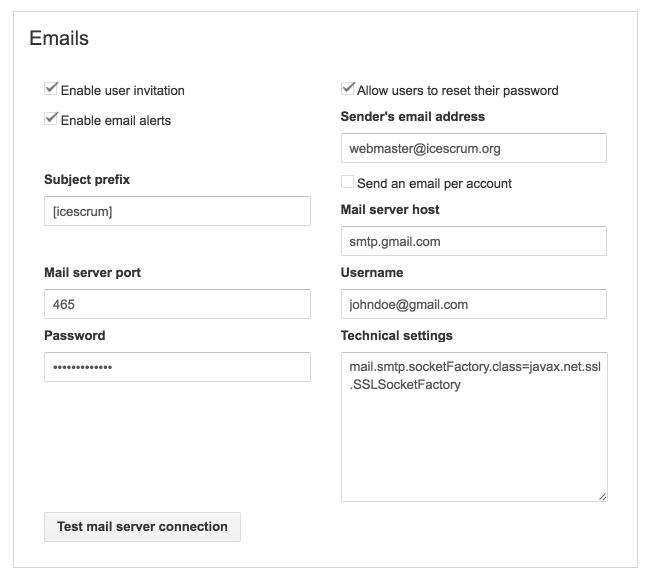
Then, you may have to add a technical setting in the “Setting” field. Usually, none or only one of these is required, but you can combine them by separating them by a comma.
- If you use anyonymous authentication (no username/password) then enter this
[js classname=”api-response”]mail.smtp.auth=false[/js]
- If your email server is accessible through SSL then enter this (this example works for smtp.gmail.com)
[js classname=”api-response”]mail.smtp.socketFactory.class=javax.net.ssl.SSLSocketFactory,mail.smtp.ssl.protocols=TLSv1.2[/js]
- If your email server is accessible through TLS then enter this (this example works for smtp.live.com, i.e. Hotmail/Live/Outlook webmail):
[js classname=”api-response”]mail.smtp.starttls.enable=true,mail.smtp.ssl.protocols=TLSv1.2[/js]
Database
Configure your database. iceScrum supports the main DBMS. Use the Test button and if it works, restart iceScrum for these changes to take effect.
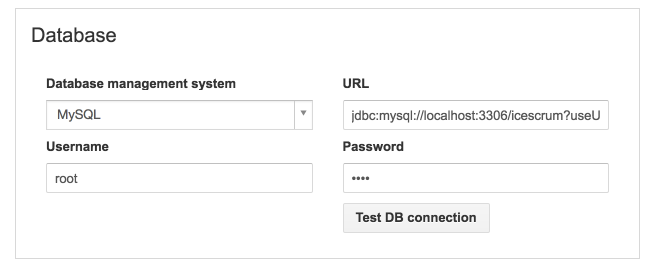
The URL is pre-filled according to the DBMS you chose. Here are sample URLs for supported DBMS:
- MySQL: jdbc:mysql://localhost:3306/icescrum?useUnicode=true&characterEncoding=utf8
- Oracle (10g XE): jdbc:oracle:thin:@localhost:1521:XE
- PostgreSQL: jdbc:postgresql://localhost:5432/icescrum
- SQL Server: jdbc:sqlserver://localhost:1433;databaseName=icescrum
Advanced settings
Configure advanced settings. You will need to restart iceScrum for most changes to take effect.
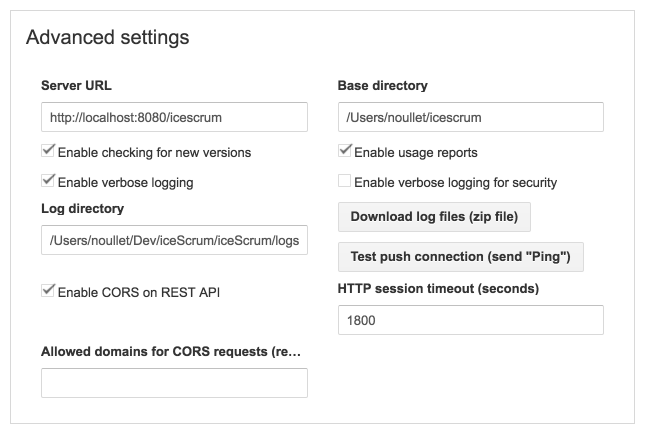
- Server URL: the external iceScrum URL you want iceScrum to expose. Changing this URL has no technical effect, it is just used to generate external links to your iceScrum server.
- Base directory: the directory (relative or absolute) used for attachments/avatars. Write permissions are required.
- Enable iceScrum user feedback: allow users to provide their feedback on their experience with iceScrum.
- Enable checking for new version: will display a warning if you don’t have the latest available version.
- Enable usage reports: report general stats about your server.
- Enable verbose logging: this is recommended in order to investigate when you come across an issue.
- Enable verbose logging for security: this is recommended in order to investigate when you come across an issue related to authentication (e.g. LDAP).
- Log directory: the directory (relative or absolute) used for log storage. Write permissions are required.
- Download log files: get your server logs directly in the web interface without having to looking for it in the server filesystem.
- Test push connection: the push connection is used to update content in real time without needing to refresh.
- Enable CORS on REST API: enable CORS support (Cross-Origin Resource Sharing), which allows AJAX request from a domain that is different from your iceScrum server.
- HTTP session timeout: the time of inactivity during which each user session stays open.
- Allowed domains for CORS requests: limit CORS requests to domains that match the regular expression, for instance (http://|.+.)example.com (use simple backslash for escaping). If empty, all domains are allowed.